
Everyone on the same vessel. Everyone on the same page.
Your boat, your people, the right accessA forty-foot-plus boat is rarely a one-person operation. There is an owner who may not be aboard, a captain who runs her, a mate, a manager, a yard, and guests who just want to know where the towels are. They should not all see the same thing — and they certainly should not all be able to change the same thing.
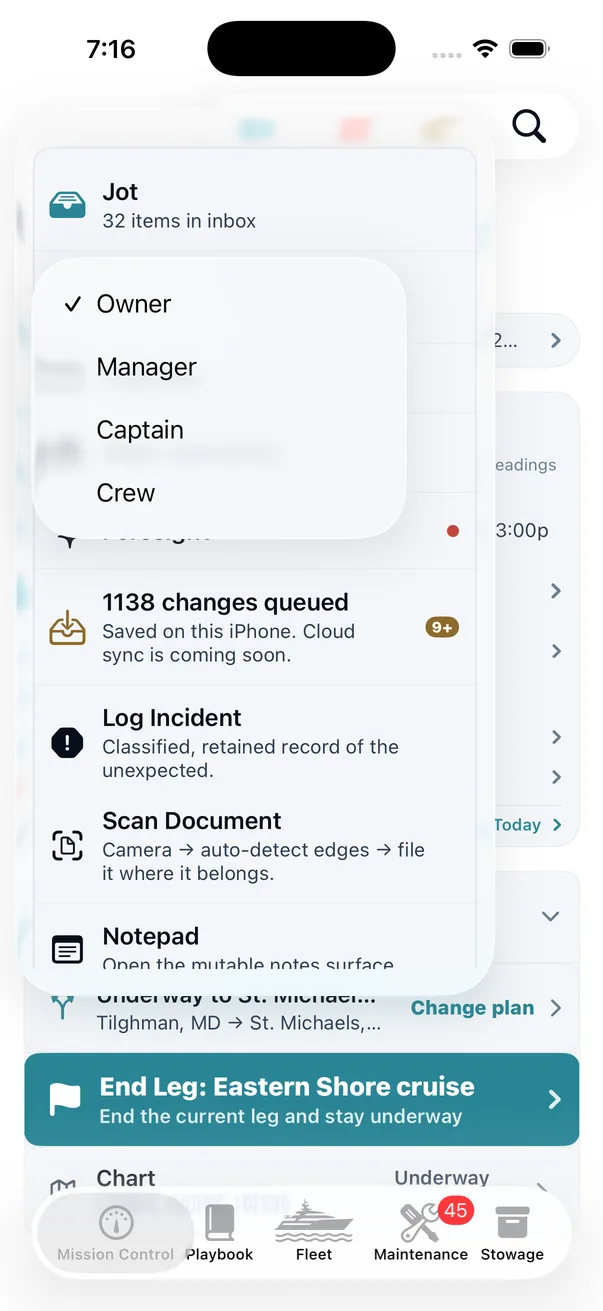
Six roles, ordered
| Role | What it is for |
|---|---|
| Owner | The vessel's authority. Sees everything, decides everything, and is the only role that never needs a permission granted to it. |
| Manager | Runs the boat's affairs without necessarily running the boat — vendors, scheduling, records. |
| Captain | Operational command. Trips, legs, crew, incidents, maintenance. |
| Crew | Mate and deckhands. Logging, jots, the day-to-day record. |
| Vendor | A scoped contractor. On the ladder, but granted nothing by it — see below. |
| Guest | Someone aboard for one trip who is not crew — a charter passenger, friend or family. On their own phone or iPad, never the web version, they see that trip and their own card, and write only their card and their messages to the crew. |
The order is deliberate and it is enforced in the code rather than in the interface: a role cannot grant an authority it does not itself hold. Hiding a button is not access control; theONE gates the action, then hides the button so nobody is offered a door that would refuse them.
The vendor is not a junior crew member
This is the part most systems get wrong. A mechanic needs to see the engine's service history and record what he did. He does not need your trips, your float plans, your logbook or the history of every system aboard — and a crew login would hand him those.
So a vendor in theONE inherits nothing from the role hierarchy. Their access is granted per card, by explicit permission, for the work in front of them. They get a work session, they record against it, the work is signed off — and the record of what they did stays attached to their card afterwards.
A yard should be able to prove what it did without being able to read what it wasn't asked about.
Temporary authority, with an expiry
Real boats need exceptions. The captain needs to edit something normally reserved to the owner while the owner is on a plane. theONE handles that as a grant with an expiry rather than a permanent promotion — the elevation is recorded, it is visible, and it lapses on its own. Nobody has to remember to take it back, which is the step that never happens.
Private notes stay private — except to the owner
Crew can keep notes that are theirs. An owner has a legitimate override, because it is ultimately the owner's vessel — an owner can open a crew member's private note or private jot.
Being straight about where that stands today: there is no record of override reads that anyone can look at. When an owner opens a private Notepad note, the app keeps a record of it in memory on that phone only — on no screen, and gone when the app restarts. Opening a private jot is not recorded at all. Crew should know the override exists; they cannot audit it, and we would rather say so than let the word “trail” do work it has not earned.
The Crew Book — people, not memberships
Over a few seasons you sail with the same people again and again: a relief captain, two mates you trust, the chef who does the summer, the delivery skipper. The Crew Book is your own card file of them — name, photo, contact, maritime details, notes, and the role you would normally give them.
The distinction that makes it work: a card is not access. Having someone in your Crew Book grants them nothing. A card only becomes a membership when you deliberately invite that person to a vessel — and then the two are linked in both directions, so you can walk from a member back to the card they came from. Adding a known mate to next week's trip is one tap instead of retyping an email address for the fifth time, and it never accidentally hands anybody a key.
The Ship’s Directory — one place to find a person
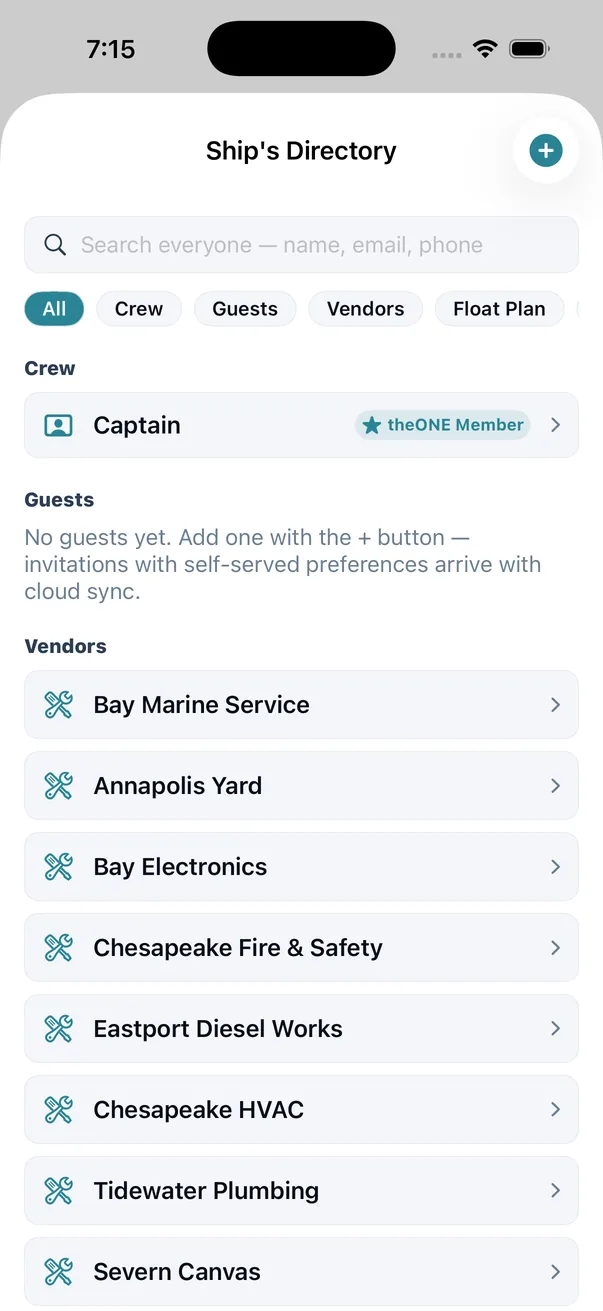
Crew, guests, vendors, float-plan contacts and emergency contacts, in one home with a single search field across all of them. When you need the number for the yard, or the shore contact on last month's float plan, you should not have to remember which part of the app that person lives in.
And the Directory owns almost nothing. Every row is a door to the canonical card that already exists elsewhere — the emergency list is a projection over contacts stored on crew and guest cards, not a second copy that can drift. A crew card whose person is actually a theONE member carries a teal star, and that badge is read from the real membership link rather than a toggle somebody has to remember to set. One truth, many doors: the same rule the whole app is built on.
More than one boat
Own or run a second vessel and Fleet becomes the switcher — a grid of vessels with the active one ringed, a summary on each, and a tap to switch. Each boat is a completely separate record: its own trips, its own systems, its own crew, its own documents. Nothing bleeds across.
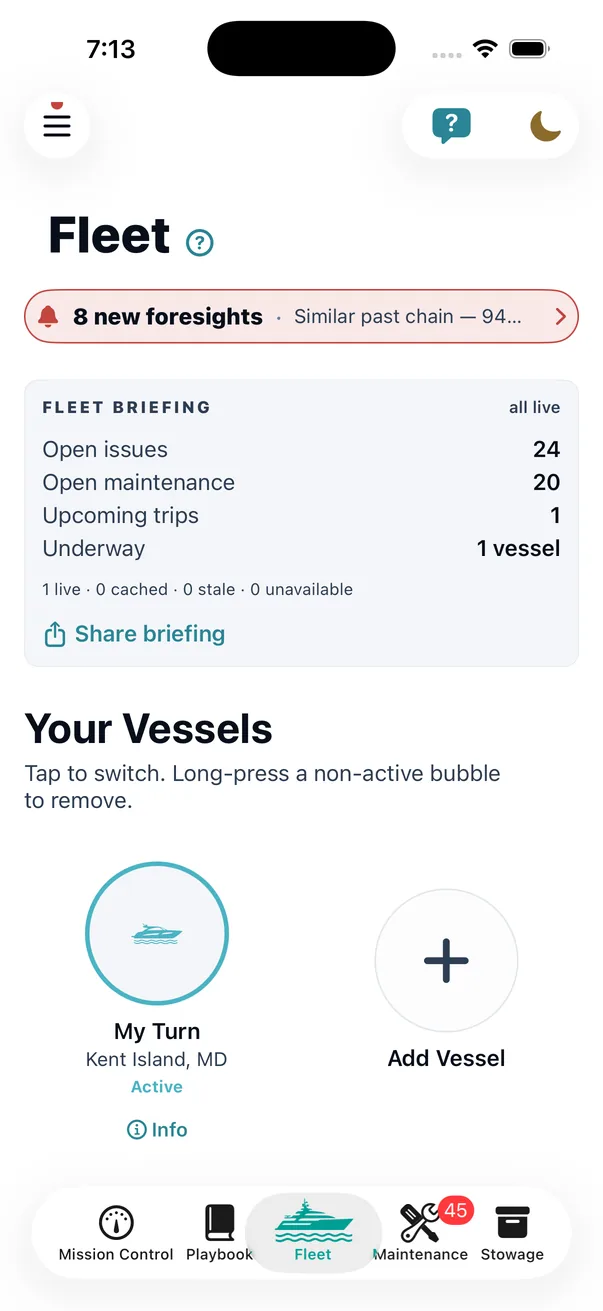
And look at the line under the briefing: 1 live · 0 cached · 0 stale · 0 unavailable. A fleet roll-up is only as good as the freshest data behind it, so theONE tells you how fresh each vessel's numbers actually are instead of presenting a cached figure as a current one.
You can switch from the Fleet grid, from the vessel name in the Mission Control header, or from your launch preference, and every route works in both directions so there is never a dead end. And if you only have one boat, the fleet roll-up never appears on Mission Control and the launch choice never appears in Preferences. A single-vessel owner should never pay in screen space for a feature they do not use.
Boat IT — the small keys
Wi-Fi passwords, marina gate codes, the chartplotter's admin login, the account the bilge alarm texts. The unglamorous credentials that run a modern boat and that otherwise live on a scrap of paper at the helm or in one person's phone. In one place, each password held in the iOS keychain and shown only after Face ID or Touch ID — or the phone’s passcode if those do not work (a switch that is on unless you turn it off). Boat IT is never sent to our server, so an entry shared with a crew member is shared on that device only — their own phone does not receive it.
Guests
A guest is invited for one trip by the owner, captain or manager, and uses theONE on their own phone or iPad — never the web version. They see that trip, their own guest card and the trip’s messages to the crew, and nothing else of the boat’s: no logbook, no maintenance, no costs, no documents, no one else’s details. They can change their own card and send the crew a message; that is all they write. Their access ends when the trip does, or sooner if the owner, captain or manager removes them.
A guest’s card — allergies, dietary and medical notes included — is seen by the owner, captain and manager and by the guest, and never by the rest of the crew. Having someone aboard for a weekend should never be a reason to hand out an account that can see maintenance costs.
In the Help Center
Honest about the edges
Roles are about clarity, not secrecy. This is designed for a well-run boat with people who trust each other — to stop the wrong person changing the wrong record by accident, and to keep a yard's access proportionate. It is not built to defend a vessel's data against a determined insider.
Credentials in Boat IT are protected on the device. They are stored in the iOS keychain, only on a phone that has a passcode, and each one opens with Face ID or Touch ID, or the phone’s passcode if those fail — the normal iPhone way, so anyone who knows the passcode can open them too. That is on by default and can be turned off. It is a strong lock on a phone somebody still has to keep hold of.
An owner override is a real power. theONE allows it rather than preventing it, because the alternative is an owner locked out of their own vessel's record. Today nothing records an override read in a form anyone can review, so crew should assume an owner can read a private note without leaving a trail.
Why it is built in rather than bolted on
Because access control added later is always cosmetic. The moment a second person touches the boat's record, the questions “who can change this” and “who has seen this” stop being administrative and start being part of what the record means.